when viewing pictures of u.s. high-defense servers , you can quickly identify common protective equipment and layout points, which will help evaluate the security and protection capabilities of the computer room. this article sorts out the common physical and network protection elements in images from a professional perspective to facilitate seo retrieval and geolocation-related content, and also provides key reference for computer room design and review.
common physical protective equipment
common physical protections in the picture include fences, access control channels (mantrap), biometric card readers, and metal detection gates. high-defense computer rooms usually have reinforced cabinets, anti-pry doors, and firewall structures. these devices are the first visual clues to assess physical security and can block unauthorized physical intrusion.
network and ddos protection visibility facilities
in the high-defense server picture, common network facilities include independent cleaning equipment, dedicated firewalls and intrusion detection systems (ids/ips). multi-layer routing and switching equipment and differentiated optical fiber links can be seen in the cabinet. together with bgp or traffic cleaning architecture, they are important image indicators for identifying anti-ddos capabilities.
cooling and power redundant layout
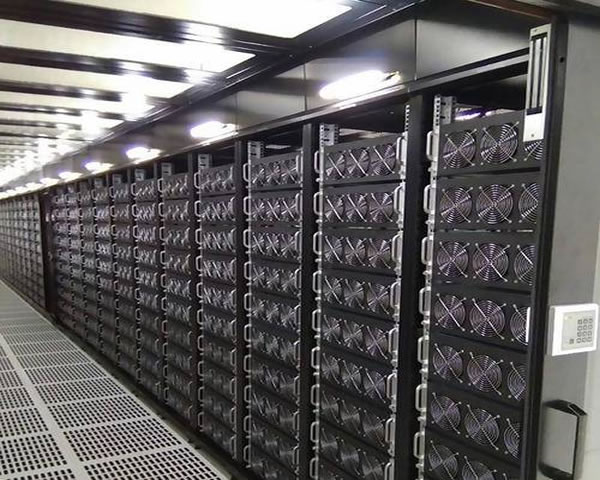
proper cooling and power supply are shown in the picture as ups battery cabinet, diesel generator room and hot/cold aisle enclosure (hot/cold aisle). the visible redundant power distribution cabinets and pipeline wiring indicate that the computer room has an uninterrupted power supply and cooling strategy, which is conducive to maintaining the continuous operation of high-defense servers in the event of attacks or failures.
rack specifications and cabling management
cabinet locks, labeled cables, patch panels and wire troughs are intuitive features that determine the standardization of operation and maintenance. neat wiring and clear markings not only improve fault response speed, but also reduce the risk of misoperation. when looking at the pictures, pay attention to cable management and rack clearance.
monitoring, alarm and emergency response center
high-defense server pictures often show monitoring screens, noc consoles and environmental sensor panels. system logs, video monitoring and visual alarms are the core of computer room security operations. they can provide rapid positioning and response capabilities when abnormalities occur, and are an important basis for evaluating the overall protection maturity.
layout points and zoning safety principles
excellent computer room layout is reflected in partition isolation, hot and cold separation and redundant placement of key equipment. if you can see physical isolation doors, independent channels, and clear security partition marks in the picture, it usually means that fault isolation and attack mitigation have been taken into consideration in the design, which will help protect the stability of the high-defense server.
summary and suggestions
by observing the physical protection, network equipment, power supply cooling and monitoring layout in the pictures of the us high-defense servers, we can initially judge the security and protection capabilities of the computer room. it is recommended to verify details by combining multi-angle pictures and technical documents, pay attention to redundancy, partitioning and cleaning capabilities, and require equipment lists and operation and maintenance specifications to supplement the image information during procurement or evaluation.
- Latest articles
- How To Optimize The System To Improve Bandwidth Utilization And Speed After Purchasing A Vps In Thailand
- Common Misunderstandings About How To Connect To Vietnam Servers To Avoid Triggering Regional Bans
- GP Singapore Server Stability In-depth Evaluation And Deployment Best Practice Guide
- Website Migration Case Sharing SEO And Speed Changes After Switching Between Hong Kong Vps And Japanese Vps
- The Technical Team’s Experience Discusses The Three Core Indicators For Choosing The Best Vps In Korea
- Performance Tuning And Monitoring Methods Of Vietnam Cn2 Network In High Concurrency Scenarios
- Buy Cloud Servers In Thailand At Low Prices, Compare Manufacturer Discounts And Long-term Operation And Maintenance Costs
- Enterprise Deploys Japanese Native Dynamic IP Address Load Balancing And Failover Solution
- Use Vietnam's Native IP Cloud Server To Build A Private VPN And Corporate Intranet Acceleration Solution
- How To Choose The Appropriate HKEX Computer Room Server Configuration For Financial Business
- Popular tags
-

Reasons To Use CN2 And The Impact On US Server Hosting
This article explores the reasons for using CN2 and its impact on US server hosting, providing practical advice for website optimization. -

Suggestions On Solving The Problem Of Fluency And Regional Restrictions When Watching Chinese Videos From Us Servers
aiming at the fluency issues and geographical restrictions when using us servers to watch chinese videos, we analyze delay, bandwidth, routing and compliance factors, and provide operational solution suggestions and implementation points at the technical and strategic levels. -
Advantages And Choices Of Multi-C Site Server Agent In The United States
This article discusses the advantages and selection suggestions of multi-C site server agents in the United States to help users better optimize SEO.